
Archive 2026
Communicate Your Results

Navigation
Every masterclass should conclude with communication and discussion of the results of the measurement.
Fermilab videoconferences
Registration and Schedules
- Please see the schedule of Fermilab videoconference offerings.
- After 19 December 2025, register by email with the following information:
- Your name
- Institution
- Institution City, State/Province, Country
- Preferred date (02-28 March or 17-18 April) and time (U.S. Central Time)
- Measurement (ATLAS Z, CMS WZH, MINERvA, or NOvA)
- Any other information
- For non-Fermilab videoconferecnes, please see the IMC Registration Circular, with links and deadlines.
All schedules are tentative at this point. To request a change, please send us an email.
Connections
Fermilab institutes connect to videoconferences through Zoom. Channels are indicated in the schedule.
2026 Schedule for masterclass videoconferences moderated by Fermilab
Times are U.S. Central. (Convert to your time zone.) This schedule is subject to change. Until registration closes, the listed measurements and Zoom links are for illustration only.
| Date/time (U.S. Central Time)1 | Measurment | Institutes | Moderator(s) | Staff | Zoom link2 |
|---|---|---|---|---|---|
| Tue 03 Mar/15:00 | ATLAS Z | Stillwater A | Abreu | Cecire | FNAL-IMC-A |
| Fri 06 Mar/15:00 | CMS WZH | Frontino, Lolotla, Puebla-BUAP | Norberg, Uribe | Cecire | FNAL-IMC-C |
| Sat 07 Mar/14:00 | ATLAS Z | Santa Cruz | Baringer, Kafle | Cecire | FNAL-IMC-A |
| Sat 07 Mar | CMS WZH | Williamsburg | -- | -- | No VC |
| Mon 09 Mar/10:35 | MINERvA | Chestertown | Junk | Pasero | FNAL-IMC-M |
| Thu 12 Mar/15:40 | MINERvA | Downers Grove, Northfield | Ramirez | Pasero | FNAL-IMC-M |
| Fri 13 Mar/14:00 | ATLAS Z | Ruston | Junk | Wetzler | FNAL-IMC-A |
| Sat 14 Mar/13:00 | CMS WZH | Orange | Soeiro | Cecire | FNAL-IMC-C |
| Sat 14 Mar/15:00 | CMS WZH | Greensboro, Mayagüez, Medellín/Divulgatorio | Natale, Soeiro | Wood | FNAL-IMC-C |
| Wed 18 Mar/15:00 | CMS WZH | Hammond, Hermosillo, Notre Dame A | Baringer, Capdevilla | Wegner, Cecire | FNAL-IMC-C |
| Fri 20 Mar/10:00 | MINERvA | Genova | Moreno, Fava | Cecire | FNAL-IMC-M |
| Fri 20 Mar/15:00 | CMS WZH | CDMX, Cuetzalan, Puebla | Capdevilla, Moreno | Wood | FNAL-IMC-C |
| Sat 21 Mar/14:00 | CMS WZH | Mayagüez | Natale, Capdevilla | Wetzler | FNAL-IMC-C |
| Sat 21 Mar | NOvA | Minneapolis | -- | -- | No VC |
| Sat 21 Mar/15:00 | MINERvA | Notre Dame B, Irvine | Moreno | Wood | FNAL-IMC-M |
| Sat 21 Mar/15:00 | ATLAS Z | Guatemala, Stillwater B | Vergis, Kafle | Cecire | FNAL-IMC-A |
| Wed 25 Mar/10:00 | MINERvA | DurhamUK | Norrick | Pasero | FNAL-IMC-M |
| Wed 25 Mar/14:45 | MINERvA | Lead | Ramirez | Pasero | FNAL-IMC-M |
| Thu 26 Mar/10:00 | MINERvA | Valencia | Junk | Pasero | FNAL-IMC-M |
| Thu 26 Mar/15:00 | CMS WZH | Osorio | Adelman, Alegria | Cecire | FNAL-IMC-C |
| Fri 27 Mar/14:00 | CMS WZH | Ixtepec | Oropeza, Ochoa | Cecire | FNAL-IMC-C |
| Fri 27 Mar | NOvA | ManhattanKS | -- | -- | No VC |
| Fri 27 Mar/14:00 | NOvA | Vermillion | Fava, Wood | Pasero | FNAL-IMC-N |
| Sat 28 Mar/14:00 | NOvA | Baltimore, Buffalo | Olivier, Wood | Plucinski | FNAL-IMC-N |
| Sat 28 Mar/15:00 | CMS WZH | Boston, Medellín/Antioquia, Quito, Houston, Stony Brook | Malik, Oropeza | Cecire | FNAL-IMC-C |
| Tue 31 Mar/15:00 | ATLAS Z | Stillwater C | Natale | Cecire | FNAL-IMC-A |
| Wed 15 Apr/11:45 | CMS WZH | Rochester | Abreu, Baringer | Cecire | FNAL-IMC-C |
| Fri 17 Apr/15:00 | CMS WZH | Puebla/PrepaChiautla, Rio de Janeiro | Rahmat | Cecire | FNAL-IMC-C |
| Sat 18 Apr/10:00 | MINERvA | Blida | Norrick | Wood | FNAL-IMC-M |
| Sat 18 Apr/14:00 | MINERvA | MadisonNJ | Malik | Pasero | FNAL-IMC-M |
| Sat 18 Apr/15:00 | CMS WZH | Montelibano | Malik, Leon | Cecire | FNAL-IMC-C |
| Sat 25 Apr/15:30 | ATLAS Z | Seattle, Stanislaus | Kafle | Wood | FNAL-IMC-A |
Notes:
- U.S. Daylight Savings Time begins Sun 08 Mar 2026. The schedule continues with the same local time intervals for Fermilab but move one hour behind in non-U.S. time zones.
- Email for password.
- Videoconference all or part in Spanish.
- Tentative assignment - replace if possible.
TRIUMF Videoconference
| Date/time (Canada/U.S. Pacific Dayight Time) | Measurement | Institutes | Moderator | Staff | Zoom link2 |
| Sat 02 May | ATLAS |
General Videoconference Plan
Revised Feb 2024.
| Time from start | Item | Remarks |
|---|---|---|
| -00:10 | Moderators arrive; institutes log in |
|
| +00:00 | Start |
|
| +00:05 | Discuss results | |
| +00:10 | Mini Virtual Visit Optional: If not doing this, go to Q&A. |
|
| +00:15 | Q&A |
|
| +00:30 | Videoconference ends |
|
ATLAS Z-path measurement 2026
This page is to help to guide mentors and teachers in planning the masterclass with the ATLAS Z-path measurement.
Need more prep? Try our Instructional Screencasts!
First things: Hypatia and the data
Each computer should have the latest version of the Hypatia program ready to run and at least one dataset of 50 events.
Download:
- Hypatia 7.4← If the zip file does not download, copy the URL and run from a different window.
These must be uncompressed and placed in an easy-to-find folder in each machine. This is a Java program, so the computers used must have Java Runtime Environment.
Alternative Online Version:
There is an online version of Hypatia that can be used. It has the advantage of running entirely in a browser. However, it does not produce files that can be read in OPloT (see below), so it requires special procedures for this. Also, Hypatia-online only reads dilepton and 4-lepton data but excludes diphoton events. To learn more or use Hypatia-online, please go the the Hypatia-online procedure page.
Each number corresponds to a group of datasets which should be enough for an entire institute. Each institute is assigned two of these, a primary group and a backup group in case of a large number of students; they are listed in the table below in that order. Within each numbered data group are datasets of 50 events, labelled by letters, A-T. Find your institute and download one set to each computer. You do not need to uncompress these.
| Data assignments for CERN masterclass institutes | ||||
Table of data assignments for Fermilab 2026 masterclass institutes. | ||||
| Date | Institute, data groups | Institute, data groups | Institute, data groups | Institute, data groups |
| Tue 03 Mar | Stillwater A, 1 and 2 | |||
| Sat 07 Mar | Santa Cruz, 1 and 2 | |||
| Fri 13 Mar | Ruston, 3 and 4 | |||
| Sat 21 Mar | Guatemala, 3 and 4 | Stillwater B, 5 and 6 | ||
| Fri 27 Mar | Sharjah, 7 and 8 | |||
| Sat 28 Mar | Stony Brook, 9 and 10 | |||
| Sat 31 Mar | Stillwater C, 7 and 8 | |||
| Sat 25 Apr | Stanislaus, 1 and 2 | Seattle, 3 and 4 | ||
| Sat 02 May | Berkeley, 1 and 2 | Burnaby, 3 and 4 | Vancouver, 5 and 6 | Victoria, 7 and 8 |
E-mail for data login and password.
Familiarize yourself:
Share these with students when appropriate!
Students arrive
This should occupy the first 30-60 min:
- Registration: please have students sign in on a registration sheet with name, school, and teacher.
- Gateway experience: have a cloud chamber, e/m apparatus, or something similar to whet interest
- Ice-breaker activity: students in small inhomogeneous groups create 1-2 good questions about particle physics, ATLAS, and/or LHC.
Shift training
Get students ready for their data analysis shift! This will take about 3 hours, though parts of it can be moved to other times of the day.
Mentor presentation, 30-60 min:
- keep it interactive - ask questions about prior experience, shows of hands, wild guesses, etc.
- give students something to touch, e.g. a carbon-fiber straw from TRT
- connect to classroom prep
- touch on standard model
- talk about your research
- template
Tour, 30-60 min:
- adds much to the day - often most popular part
- if you have an accelerator to show, great!
- if not: any interesting labs, even if not particle physics, are still great
- have enthusiastic grad students around to chat and explain
Analysis Prep (30-60 min):
- Have a teacher lead this if practical
- Use/adapt the data analysis slides (PPT) (PDF) (Google).
- Important: go through 5-10 events from Group 1 Set A on the projector with the students. Show them how to:
- Turn on Hypatia
- Get the data
- Set the pt cut
- Put tracks into the invariant mass window
- Save their data and upload to OPloT. (Show the 01-Jan-2012 sample.)
- Identify events with them - ask them what is what.
Lunch with a Physicist (30-60 min):
- This is also very popular and a great way for students to interact and get comfortable with scientists.
Data analysis
This is the heart of the masterclass and takes 60-90 min. There should be 2 students at each computer, cooperating to get their data measured. Mentors, tutors, and teachers should circulate to help the students analyze the events and work out any problems they have. Don't give them answers. Help them figure things out and learn to see data as scientist does. Remind them that each event is a candidate Z, Higgs, or something else - not a definitively identified particle.
Here are some items that can help them (and you):
- Cheat sheet (short) (long)
- ATLAS Event Guide
- ATLAS Analysis Procedure
Students will need to upload to OPlot. Help them with this.
Sharing results
This takes a little over one hour. Both parts are important.
Discussion (30-45 min):
- Mentor leads, students interact
- Look at combined mass plots for your institute in OPloT: dilepton, 4-lepton, diphoton
- Help students point out peaks, bumps, significance; discuss results.
- Each institute is assigned another institute to question: look at their data as well. Students should form questions and comments.
Videoconference (30-45 min):
- FNAL institutes use the table above
- CERN institutes connect using special links CERN-VC1 and CERN-VC2; consult schedule for which to use.
- Someone should log into the videoconference 15 min early to be sure the connection is established. See the Schedules page.
- Follow the agenda on Indico:
- Introductions and warm-up
- Institute results
- Combined results
- Discussion, Q&A, and wrap-up
- It is good to have a student spokesperson but try to arrange so it is not too hard for another student to make a comment or ask a question.
After this, we have post-discussion and closeout.
Before you go home:
Please report your attendance numbers on our Attendance Form!
Have a great day!
CMS WZH-path measurement 2026
Short URL for this page: cern.ch/imc-cms-0.
This page is to help to guide mentors and teachers in planning the masterclass with the CMS WZH-path measurement..
Navigation
Need more prep? Try our Instructional Screencasts!
First things: iSPy and spreadsheets
Each computer should have robust internet access. Two students should work together at each computer to complete a 100 event data file.
Two students work as a team:
- Between the two students, one must have access to the event display program iSpy-webgl using an up-to-date browser.
- One student must have online access to the assigned CMS Masterclass Google Spreadsheet. Do to limitations on Google sheets, only one connection should be made for each team analyzing a data file.
- Students should have some preparation in or out of school before the masterclass day to demystify terms and introduce undersanding of particle data.
Familiarize yourself:
Please note that introduction of the new CIMA data tool means key procedures have changed. It is important for mentors to and teachers review the documentation and try it out in the CIMA Sandbox.
- CMS Masterclass screencasts
- CMS Masterclass documentation (2026 version)
- CMS Masterclass website ← needs to be updated
- Try the measurement out with iSpy-webgl and CMS Masterclass Google Sheet (use CMS-Sandbox-13Jan2026).
Share these with students when appropriate!
Students arrive
Students will likely come with their teachers in groups. Please make sure they know where to go and are greeted, Then:
- Please ask students to sign in so you can get an accurate count.
- Gateway experience: have a cloud chamber, e/m apparatus, or something similar to whet interest
- Ice-breaker activity: students in small heterogeneous groups create 1-2 good questions about particle physics, ATLAS, and/or LHC.
Students ramp up
Get students ready for their data analysis! This will take about 3 hours, though parts of it can be moved to other times of the day.
Mentor presentation, 30-60 min:
- keep it interactive - ask questions about prior experience, shows of hands, wild guesses, etc.
- give students something to touch, e.g. a wave-shifting fiber
- connect to classroom prep
- touch on standard model
- talk about your research
- template
Tour, 30-60 min:
- adds much to the day - often most popular part
- if you have an accelerator to show, great!
- if not: any interesting labs, even if not particle physics, are still great
- have enthusiastic grad students around to chat and explain
Analysis Prep (30-60 min):
- Have a teacher lead this if practical.
- Use/adapt the data analysis slides (PPTX) (PDF) (Google).
- Important: go through "masterclass-samples" in iSpy-online on the projector with the students:
- Show students how to navigate to a data file
- Discuss how to use the tools in iSpy-online (or iSpy-dvd)
- Discuss each event in terms of:
- Particle tracks, missing energy, ECal deposits, etc.
- Most likely parent particle (ask them what is what)
- Show how to record results on sample spreadsheet.
Lunch with a Physicist (30-60 min):
- This is also very popular and a great way for students to interact and get comfortable with scientists.
Data Analysis
This is the heart of the masterclass and takes 60-90 min. There should be 2 students at each computer, cooperating to get their data measured. Mentors, tutors, and teachers should circulate to help the students analyze the events and work out any problems they have. Don't give them answers. Help them figure things out and learn to see data as scientist does. Remind them that each event is a candidate Z, W, Higgs, or something else - not a definitively identified particle.
- Instructional screencast
- iSpy-webgl event display
- Cheat sheet
- Google Sheets: See the table below. We will link CMS Masterclass Spreadsheets to the names (locations) of the institutes in for the appropriate dates; combination sheets showing results to examine in masterclasses will be in the rightmost column, where applicable.
Share your results
This takes about one hour. Both parts are important.
Discussion (30-45 min):
- Mentor leads, students interact
- Look at combined mass plots for your institute in spreadsheet.
- Help students point out peaks, bumps, significance; discuss results.
- Each institute is assigned another institute to question: look at their data as well. Students should form questions and comments.
Videoconference (30-45 min):
Connecting to videoconferences:
- For CERN-based videoconferences, see the schedule page of the IMC website.
- For Fermilab-based masterclasses, see the schedule on the Communicate Your Results page. You will find both the videoconference schedule and a breakdown of how the videoconference works.
Before you go home:
Please report your attendance numbers on our Attendance Form!
Have a great day!
MINERvA muon neutrino measurement 2026
Navigation
Remote Masterclass? Students need more prep? Try MINERvA Instructional Screencasts!
First things: prepare ahead
Each computer should have robust internet access. Two students should work together at each computer to complete a 50 events dataset. Before the masterclass, mentors, tutors, and teachers should:
- Schedule and participate in an online Orientation.
- Review the MINERvA Masterclass Documentation and Understanding MINERvA Masterclass Results.
- Try out the measurement. Use the practiceTuples and Practice Spreadsheet.
- Prepare a presentation on particle physics and neutrino experiments.
- Review the MINERvA Masterclass Measurement slides (PPT) (PDF).
- Go over all the steps in this page.
- Prepare and test your Zoom connection.
Students arrive
This should occupy the first 30-60 min
- Registration: please have students sign in on a registration sheet with name, school, and teacher.
- Gateway experience: have a cloud chamber, e/m apparatus, or something similar to whet interest
- Ice-breaker activity: students in small inhomogeneous groups create 1-2 good questions about particle physics, neutrinos, MINERvA, and/or DUNE.
Shift training
Get students ready for their data analysis shift! This will take about 3 hours, though parts of it can be moved to other times of the day.
Mentor presentation, 30-60 min:
- keep it interactive - ask questions about prior experience, shows of hands, wild guesses, etc.
- give students something to touch, e.g. a wave-shifting fiber
- connect to classroom prep
- touch on standard model
- talk about your research
- Focus on theme of MINERvA masterclass: using a neutrino beam from Fermilab to probe the atomic nucleus and better understand weak scattering in preparation for DUNE.
Tour, 30-60 min:
- adds much to the day - often most popular part
- if you have an accelerator to show, great!
- if not: any interesting labs, even if not particle physics, are still great
- have enthusiastic grad students around to chat and explain
Analysis Prep (30-60 min):
- Have a teacher lead this if practical.
- Use/adapt the MINERvA Masterclass Measurement slides (PPT) (PDF).
- Important: go through "masterclass-samples" in ARACHNE Simple on the projector with the students:
- Show students how to navigate to a data file.
- Discuss how to use the tools in ARACHNE.
- Discuss each event in terms of:
- Signal vs. (vertex or recoil) background
- Where the neutrino goes, where the vertex is, muon and proton tracks
- Copying kinematic data to the spreadsheet.
- What we plan to do with the recorded data.
Lunch with a Physicist (30-60 min):
- This is also very popular and a great way for students to interact and get comfortable with scientists.
Data Analysis
This is the heart of the masterclass and takes about 60 min. There should be 2 students at each computer, cooperating to get their data measured. Mentors, tutors, and teachers should circulate to help the students analyze the events and work out any problems they have. Don't give them answers. Help them figure things out and learn to see data as scientist does.
- Instructional Screencast
- Student Start Page - give students http://tinyurl.com/minervastudent
- Cheat Sheet
Data Assignments 2026:
International Masterclasses
| Date/time (U.S. Central Time) | Institute (Data Group) | Institute (Data Group) | Spreadsheet |
|---|---|---|---|
| Mon 9 Mar/14:00 - 2026 | Chestertown (A) | FNAL-MINERvA-2026-03-09 | |
| Thu 12 Mar/15:30 - 2026 | Downers Grove (B) | Northfield (C) | FNAL-MINERvA-2026-03-12 |
| Fri 20 Mar/10:00 - 2026 | Genova (E) | FNAL-MINERvA-2026-03-20 | |
| Sat 21 Mar/15:00 - 2026 | Notre Dame B (F) | UC-Irvine (D) | FNAL-MINERvA-2026-03-21 |
| Wed 25 Mar/10:00 - 2026 | Durham (F, G) | FNAL-MINERvA-2026-03-25 | |
| Wed 25 Mar/14:45 - 2026 | Lead (E) | FNAL-MINERvA-2026-03-25-SD | |
| Thu 26 Mar/10:00 - 2026 | Valencia (A) | FNAL-MINERvA-2026-03-26 | |
| Sat 18 Apr/10:00 - 2026 | Blida (B) | FNAL-MINERvA-2026-04-18a | |
| Sat 18 Apr/14:00 - 2026 | Madison (C) | FNAL-MINERvA-2026-04-18b |
*no videoconference
If >50 students are expected, contact Masterclass Coordination for more data groups.
All MINERvA Data for International Masterclasses:
- mergedTuples 1-25
- mergedTuples 26-50
- mergedTuples 51-75
- mergedTuples 76-100
- mergedTuples 101-125
- mergedTuples 126-150
- mergedTuples 151-175
- practiceTuples (includes teacherTuple and Archive)
Each mergedTuple has ~50 "gates" with multiple events. The student must find the useful event, if it exists, in each gate.
Sharing Results
This takes a little over one hour. Both parts are important.
Discussion (30-45 min):
- Mentor leads, students interact.
- View and discuss combined plots for your institute in spreadsheet.
- Student/small group discussion questions (version 1) - make a copy of this Google doc
- Student/small group discussion questions (version 2) - make a copy of this Google doc
- Student/small group discussion questions (version 2) - PDF
- Help students analyze histograms to find:
- Neutrino beam momentum and energy
- Uncertainty in px and py
- Estimate of carbon nucleus radius using Uncertainty Principle and Fermi Gas approximation
- Discuss meaning of result for understanding nucleus and weak scattering.
For more information, see Understanding MINERvA Masterclass Results.
Videoconference (30-45 min):
Connecting to videoconferences:
Course of a videoconference:
- Connect to videoconference link or Indico page (see above).
- Someone should log into the videoconference 15 min early to be sure the connection is established. See the Schedules page.
- Follow the agenda on Indico:
- Introductions and warm-up
- Institute results
- Combined results
- Discussion, Q&A, and wrap-up
- It is good to have a student spokesperson but try to arrange so it is not too hard for another student to make a comment or ask a question.
After this, we have post-discussion and closeout.
Before you go home:
Please report your attendance numbers on our Attendance Form!
We ask teachers, tutors, and mentors to fill out a short survey within a day or two after the masterclass.
Have a great day!
NOvA Neutrino Measurement 2026
Navigation
- Screencasts
- Preparation
- Physical space set-up
- The agenda outline
- Opening activities
- Mentor presentation
- NOvA Overview and Analysis, Part 1 - Far Detector
- NOvA Analysis, Part 2 - Near Detector and Conclusions
- Discussion of Results - Understanding the Results
- Videoconference (optional)
- Data and data analysis tools
Notes:
This page is meant to guide masterclass leads: physicists, teachers, tutors, etc. Students participating in the NOvA masterclass can access data and tools through the Student Start Page.
Remote Masterclass? Students need more prep? Try NOvA Instructional Screencasts, coming soon!
Preparation Before Masterclass Day
Before the masterclass, mentors, tutors, and teachers should:
- Schedule and participate in an online Orientation.
- Create an agenda for the masterclass day.
- **Check with participating teachers and students to ensure they have access to Google Colaboratory**. Some schools block this feature; school IT staff may be able to unblock this feature. A personal Google account should grant access to Google Colab. Students may also partner up with another student who has access to Colab, or they may utilize the alternative Binder site (NOvAMasterclass folder).
- Prepare or invite a speaker to give a presentation on particle physics and/or neutrino experiments.
- Try out a Python Coding exercise, such as the ones linked below:
- Remind participants that they will need a laptop (or a Chromebook or a similar device) during the event.
- Check that the space that will be used for the masterclass has appropriate internet access available.
- Review this entire page, which contains information on the NOvA Measurement and how to understand the results.
- Print out cheat sheet - one per student.
Physical Space Setup
The below assumes a classroom-like space, with a large front white board. Similar setup could also be achieved with two or three free-standing easel poster boards.
- Provide information for participant internet connection (Wi-Fi information, etc.)
- Provide a link, preferably shortened, to the agenda page for the day. This is where students will access their data and coding notebooks.
- Post the following in the room for reference throughout NOvA masterclass:
- From left to right, write "Neutrino Beam Source", "Near Detector", and "Far Detector" on a whiteboard or poster paper that will serve of the relative layout of these three important components of the NOvA experiment. These posters will also serve as a locations to post CC/NC ratios at each detector for comparison. It is recommended to write the overall NOvA masterclass goal on the board or poster paper as well. Refer to the diagram below for an example of this set-up.:
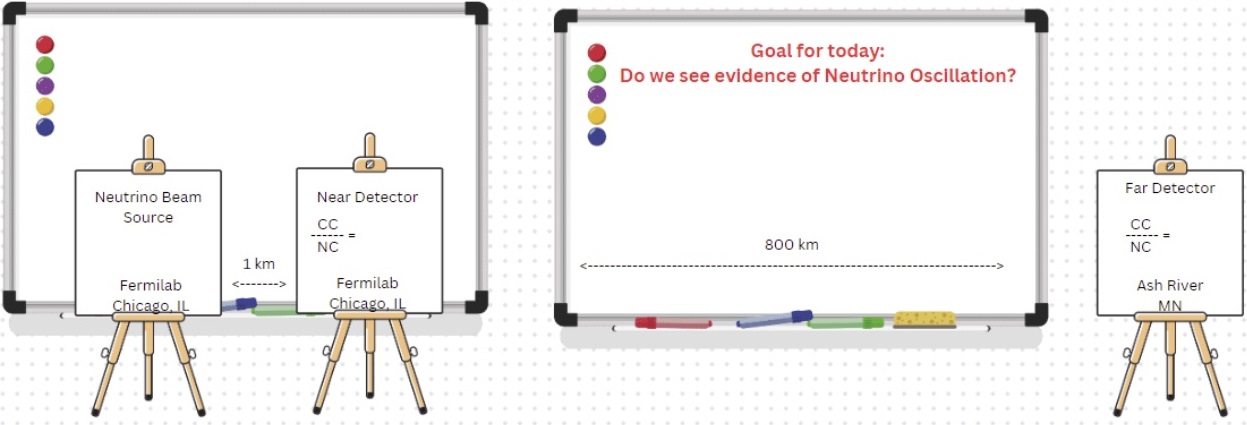
The Agenda (Click here for an example agenda.)
Opening Activities: (~30-60 min) - optional
- Registration: please have students sign in on a registration sheet with name, school, and teacher.
- Have students participate in an ice-breaker activity.
- As a large group, have a Setting the Stage discussion to provide scope and context of physics and particle physics.
Mentor Presentation: (30-60 min) - highly encouraged
- Speaker could be a physicist or physics graduate student.
- Keep it interactive - ask questions about prior experience, show of hands, wild guesses, etc.
- Connect to classroom prep
- Touch on standard model, neutrinos, neutrino oscillations, and his/her research.
- Focus on theme of NOvA masterclass: looking for evidence of neutrino oscillation.
Tour or break: (30-60 min) - optional
- Tours add much to the day - often most popular part
- If you have an accelerator to show, great! Maybe a cloud chamber.
- If not: any interesting labs, even if not particle physics, are still great
- Have enthusiastic grad students around to chat and explain
NOvA Overview & Analysis Part 1 (NOvA Far Detector): (~60-90 min) - required
- Hand out cheat sheet
- Post goal of today's analysis: Do we see evidence of neutrino oscillation?
- NOvA Overview and Background - Slides 1-10
- Speaker notes on slides 1-10 - link coming soon
- Link to video referenced in slide 5 - How Do Neutrino Oscillations Work?
- NOvA Far Detector, Charged Current (CC) / NuMu Interactions - Slides 11-16
- Speaker notes on slides 10-16 - link coming soon
- Far Detector CC NuMu Events, Form, & Results/spreadsheet - See links in Data & Data Analysis Tools table (below)
- NOvA Far Detector, Neutral Current (NC) Interactions - Slides 17-20
- Speaker notes on slides 17-20 - linkcoming soon
- Far Detector NC Events, Form, & Results/spreadsheet - See links in Data & Data Analysis Tools table (below)
- Part 1 Conclusions - Slide 21-22
- Write this ratio of CC/NC on the board/poster labeled "Far Detector" in Physical Space Setup
- Write on the board the decided cut-off length that we will use to separate CC/Nu events from NC events. (This will be used in the code for part 2.)
Lunch with a Physicist: (~30-60 min) - highly encouraged
- You may have to move Lunch earlier or later in agenda, depending on your specific timing.
- This is also very popular and a great way for students to interact and get comfortable with scientists.
- Physics demonstrations - Bring in a couple of physics demonstrations that normally wouldn’t be available/accessible to high school physics programs. Demos involving liquid nitrogen are typically fan favorites!
NOvA Analysis Part 2 (NOvA Near Detector) & Discussion: (~60 min) - required
- NOvA Near Detector Analysis - Slides 23-24
- Python Near Event Analysis - Participant Version
- Do a “File Make a Copy”
- Github link
- "ANSWER KEY": Python Near Event Analysis - Completed Version (Do not share with students)
- Do a “File Make a Copy”
- Note: Depending on cut-off length, CC(NuMu)/NC ratio will be anywhere between 0.40 or higher.
- Overall conclusions
- Write the ratio of CC/NC on the board/poster labeled "Near Detector" in Physical Space Setup.
- Discuss...do we see evidence of neutrino oscillation? What is your evidence?
Break or tour: (~10-30 mins) - optional
- Placement of this will vary based on your specific timing.
NOvA Videoconference - : (~30 min) - highly encouraged
- See "Sharing Results" below
- Note that student representative(s) should be prepared to present answers to these questions during the videoconference:
- What track length did you (as a group) decide to use to separate charged current (NuMu) events from neutral current events?
- Did you see evidence of neutrino oscillation? What is your evidence and reasoning?
End of day
Data and Data Analysis Tools
This is the heart of the NOvA masterclass and takes about 2 hours: ~1-1.5 hours for Part One (NOvA overview and Far Detector training & analysis), and ~1 hour for Part Two (Near Detector training & analysis and conclusions). There should be 2 students at each computer, cooperating to get their data measured. Mentors, tutors, and teachers should circulate to help the students analyze the events and work out any problems they have. Don't give them answers. Help them figure things out and learn to see data as scientist does.
- Instructional Screencast
- Student Start Page
- Cheat Sheet
Institute NOvA Data, Forms, and Spreadhseets 2026:
International Masterclasses
| Date/time CT | Institute | Far Detector CC Events | Student Form for Far Detector CC Events | Far Detector NC Events | Student Form for Far Detector NC Events | Spreadsheet |
|---|---|---|---|---|---|---|
| Sample Mar/00:00 | Sample | CC/NuMu Data | CC/NuMu Form | NC Data | NC Form | Sample-03Mar2023 |
| Sat 21 Mar/No-VC | Minneapolis* | CC/NuMu Data | CC/NuMu Form | NC Data | NC Form | MI-21Mar2026 |
| Fri 27 Mar/No-VC | ManhattanKS* | CC/NuMu Data | CC/NuMu Form | NC Data | NC Form | MA-27Mar2026 |
| Fri 27 Mar/14:00 | Vermillion | CC/NuMu Data | CC/NuMu Form | NC Data | NC Form | VE-27Mar2026 |
| Sat 28 Mar/14:00 | Baltimore | CC/NuMu Data | CC/NuMu Form | NC Data | NC Form | BA-28Mar2026 |
| Sat 28 Mar/14:00 | Buffalo | CC/NuMu Data | CC/NuMu Form | NC Data | NC Form | BU-28Mar2026 |
*no videoconference
Sharing Results
Videoconference (~30 min):
Connecting to videoconferences:
- See the schedule on the Videoconferences page. (Scroll down to the 2026 Schedule for NOvA masterclass videconferences.)
Course of a videoconference:
- Click on the NOvA Zoom link on the videoconferences page refereced above. This will connect you to the Zoom videoconference. Note that the dates/times listed on the schedule are in U.S. Central Time. (Convert to your time zone.)
- Someone should log into the videoconference 10-15 min early to be sure the connection is established.
- Approximate agenda:
- Greetings (~5 min.)
- Students present answers to these questions (~5 min)
- What track length did you (as a group) decide to use to separate charged current (NuMu) events from neutral current events?
- Did you see evidence of neutrino oscillation? What is your evidence and reasoning?
- Pro result and/or virtual visit (~10 min.)
- Q&A (~10 min.)
- It is good to have a student spokesperson but try to arrange so it is not too hard for another student to make a comment or ask a question.
After this, we have post-discussion and closeout.
Before you go home:
Please report your attendance numbers on our Attendance Form! (TBD)
We ask teachers, tutors, and mentors to fill out a short survey within a day or two after the masterclass. (TBD)
Have a great day!
Get Oriented
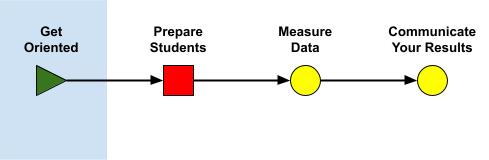
Masterclass orientations help to guide mentors in preparing their teams, including teachers.
Pre-orientation Considerations
There are a few things that need to be done in order to prepare for a successful data measurement experience for students:
- Ensure that students will have computers with internet access. One computer per two students is recommended for the best experience.
- As an instructor, participate in an online orientation for the measurement (e. g. CMS, ATLAS, MINERvA, NOvA, ...).
- Practice the measurement yourself using the practice tools available on the page for your masterclass.
- Review slides from the measurement pages, and prepare your own introduction for the students to set the tone for the day.
- Review the rest of this page
- If you will be doing a video conference, prepare and test your Zoom connection.
Masterclass Orientation
A masterclass orientation can be done online via Zoom or in person with a visit from a QuarkNet staff member or fellow. It is intended for teachers and mentors. Here is what can be covered:
- Classroom prep for the masterclass
- Try out a your masterclass measurement
- Walk-through of masterclass logistics
- Masterclass Library
- Zoom test
- Q&A
Orientations can come in multiple flavors with different durations and organizational schemes. They can range from short updates or introductions to full-day Masterclass Orientation Workshops. Most orientations will be done remotely with a QuarkNet staff member or fellow. Orientation Workshops can be remote or in-person.
Register for Masterclass Orientation on the Google form as early as possible or no less than one week prior to your earliest preferred date.
Orientation Schedule
Start time in U.S. Central Time (CT) and facilitator in parentheses. (To convert to your time zone, you can use this online tool.) New registrants: we can accommodate days and times not yet shown on this schedule. Zoom channel links will be provided directly to participants.
| Date | Institute (Start time) | Measurement | Comments |
| 22 Feb 2025 | Drew University (08:00 CT)* | CMS | Workshop |
| 22 Feb 2025 | Kansas State University (09:00 CT)* | NOvA | Workshop |
| 26 Feb 2025 | SURF (11:30 CT) | NOvA | Zoom |
| 01 Mar 2025 | University of Puerto Rico Mayaguez* | MINERvA | Workshop |
| 06 Mar 2025 | Durham UK (09:00 CT) | MINERvA | Zoom |
| 07 Mar 2025 | Irvine (12:00 CT) | NOvA | Zoom |
* Site visit.